|
1
|
|
|
2
|
|
|
3
|
|
|
4
|
- SAML is an XML vocabulary.
- This means that it is a collection of XML elements, and each element
has a clear definition of what it means, how it should be processed by
an application, and the value each element may contain.
|
|
5
|
|
|
6
|
|
|
7
|
- I am sure that you've had this experience: you log onto a system, do
some work, then when you access another part of the system … argh … the
system asks you to log on again!
During a single session you may have to log on many times. This is very frustrating.
- SAML can be used to enable you to sign on just once (single sign-on,
SSO). Your authentication
information is passed (behind the scenes) between each application you
visit.
|
|
8
|
- A user authenticates to one web site, and then, without additional
authentication, is able to access some personalized or customized
resource at another site.
|
|
9
|
|
|
10
|
|
|
11
|
|
|
12
|
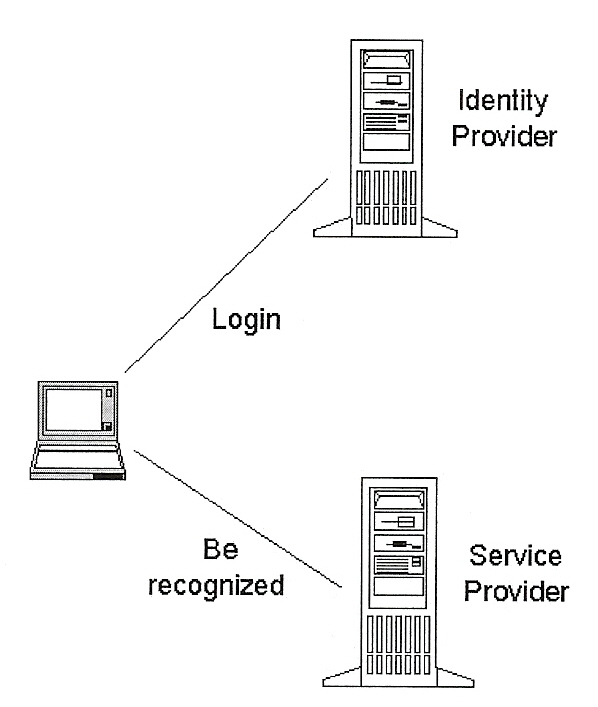
- Improved online experience for users
- With SAML single sign-on (SSO) a user can authenticate with an identity
provider and then access various service providers without additional
authentication.
- Risk transference, task specialization
- Responsibility for management of identities is given to the identity
provider, which is more often compatible with its business model than
that of a service provider. (The
right task for the right person)
- Reduced administrative cost for service providers
- The cost of maintaining account information is transferred to the
identity provider. Multiple
organizations don't have to independently collect and maintain
identity-related data (e.g., usernames and passwords).
|
|
13
|
- The following slides will formalize some of the concepts that we have
seen on the preceding slides.
|
|
14
|
- An Identity Provider provides
information about a user in the form of an "assertion".
|
|
15
|
- Authentication (identity information):
- "I assert that this ___ user was authenticated by this ___ means
at this ___ datetime."
- Attribute:
- "I assert that this ___ user has this ___ attribute with this ___
value."
- Example: "I assert that John Doe's membership level is gold
member."
- Authorization Decision (entitlement information):
- "I assert that this ___ user is [isn't] allowed to read [write,
execute] this ___ resource."
|
|
16
|
- Typically, a service provider issues a request to an identity provider,
and the identity provider responds (with an assertion).
- Scenario: A user attempts to access a resource at a service provider's
website. The service provider
must determine whether to allow it.
So, without the user knowing, the service provider requests
information from an identity provider.
The identity provider responds with a SAML assertion. Based upon the assertion the user is
or isn't allowed to access the item.
|
|
17
|
- Authentication information:
- Request: "please provide authentication info about John Doe (the
user)"
- Response: "John Doe was authenticated on ____ (datetime) by the
user presenting a password over a protected session. This authentication info is valid
during this ____ datetime."
- Attribute information:
- Request: "please tell me John Doe's credit line"
- Response: "John Doe has a credit line of $5,000"
- Entitlement (authorization) information:
- Request: "Is John Doe entitled to read the employee
salaries?"
- Response: "John Doe should be denied read access to the employee
salaries"
|
|
18
|
- Subject (principal) - the user; the entity being authenticated. The subject could be a human, but
could also be some other kind of entity, such as a company or a
computer.
- Note: I will use "subject" and "user"
interchangeably.
- Asserting party (SAML authority) - a system entity that makes SAML
assertions.
- Also called the Identity Provider (IdP).
- Relying party (SAML requestor) - a system entity that uses the received
assertions.
- Also called the Service Provider (SP).
|
|
19
|
- (Request) A service provider can ask an authority one of these
questions:
- What authentication info do you have for this ___ subject?
- For this ___ subject, what are his values for these ___ attributes?
- Should this ___ subject be allowed to take these ___ actions on this
___ resource?
- (Response) An authority can make these statements:
- This ___ subject was authenticated on this ___ datetime, using this ___
mechanism.
- This ___ subject has this ___ value for this ___ attribute.
- For this ___ subject, taking this ___ action on this ___ resource, the
decision is ___.
|
|
20
|
|
|
21
|
- … common information that applies to the assertion as a whole,
- followed by one or more statements.
|
|
22
|
- When the assertion was made.
- Who made the assertion.
- The person (subject) that the assertion is about.
- The conditions (datetime) under which the assertion holds.
- What method was used to authenticate the person, and the datetime that
the authentication was done.
- A description of (or reference to) the context in which authentication
was done.
- Example of authentication context information: what were the
password-generation rules that the person had to follow, how are
passwords protected, how often do users have to change their password?
- The next slide discusses how authentication context information is
created ………………………..
|
|
23
|
- … the Identity Provider and the Service Provider get together and create
a business agreement.
- The Identity Provider tells the Service Provider what kinds of security
policies he has, e.g.,
- User passwords are required be at least 8 characters in length and they
must contain both upper and lower case letters.
- Users are required change their password at least once every six
months.
- The Service Provider decides whether the Identity Provider's policies
are adequate for his needs.
- The two parties come to an agreement.
Their lawyers may write up legal documents.
- Thus, when the SAML assertions do start flying, the Service Provider can
make assumptions about the Identity Provider.
|
|
24
|
- Suppose an Identity Provider (IdP) sends an Authentication Assertion to
a service provider. What does the IdP's assertion mean:
1. "I assert the authenticity of John Doe" No
2. "I authenticated John Doe by this ___ method" Yes
- An Identity Provider does not assert the authenticity of John Doe to a
service provider.
- An Identity Provider does assert that he authenticated John Doe.
|
|
25
|
|
|
26
|
|
|
27
|
|
|
28
|
|
|
29
|
|
|
30
|
|
|
31
|
- Suppose that you are a service provider, and John Doe is requesting
access to some of your resources.
And suppose an Identity Provider sends you an Authentication
Assertion.
- Here is some information you might want to know, regarding how the
Identity Provider does authentication:
- What authentication mechanism does the IdP use?
- Password or certificate-based SSL or ...
- What mechanisms for storing and protecting credentials does the IdP
use?
- Password rules or smartcard or ...
- What mechanisms for minimizing compromise of credentials is used?
- Password renewal frequency
- What is the initial user identification mechanism?
- Face-to-face or online or ...
- This information is found in the Authentication Context. Thus, the Authentication Context
describes the context in which authentication is done. This information
enables you (the service provider) to assess the quality of the
authentication assertion.
|
|
32
|
- The variety of information that a service provider might need to assess
the quality of an authentication assertion is infinite.
- As a convenience the SAML working group has defined a set of classes
that contain a "canned" collection of Authentication Context
information.
- Each class is identified by a URN.
- Here's the URN for one class: urn:oasis:names:tc:SAML2.0:ac:classes:PasswordProtectedTransport
This URN by itself is intended to give some information:
"The subject was authenticated through the presentation of a
password over a protected session"
Further details may be obtained by requesting (from the
Authentication Authority) the XML document corresponding to the
URN. (See next slide for an
example)
|
|
33
|
|
|
34
|
- Password over protected session
- urn:oasis:names:tc:SAML:2.0:ac:classes:PasswordProtectedTransport
- Password over an unprotected HTTP session
- urn:oasis:names:tc:SAML:2.0:ac:classes:Password
- XML digital signature
- urn:oasis:names:tc:SAML:2.0:ac:classes:XMLDSig
- Smartcard
- urn:oasis:names:tc:SAML:2.0:ac:classes:Smartcard
- Fixed-line telephone, using a telephony protocol such as ASDL
- urn:oasis:names:tc:SAML:2.0:ac:classes:Telephony
|
|
35
|
|
|
36
|
|
|
37
|
|
|
38
|
|
|
39
|
|
|
40
|
|
|
41
|
|
|
42
|
|
|
43
|
|
|
44
|
|
|
45
|
|
|
46
|
|
|
47
|
|
|
48
|
|
|
49
|
|
|
50
|
|
|
51
|
|
|
52
|
|
|
53
|
|
|
54
|
- A "profile" is an interaction pattern.
- The following slides show how an identity provider and a service
provider interact with a web browser to enable a user to sign on just
once.
- That is, the following slides show the web browser SSO profile.
|
|
55
|
- The Internet protocol used to exchange SAML documents is called a
"SAML binding".
- The following slides show how to exchange SAML documents using the HTTP
protocol. That is, the slides
show the use of the SAML HTTP binding.
|
|
56
|
- Using his browser, John Doe logs into AirlineInc.com and purchases an
airplane ticket.
- Upon completion of the purchase, AirlineInc.com provides a Web page
containing a link to CarRentalInc.com, where he can make a car
reservation.
- John Doe clicks on the link. Behind the scenes the car rental service
obtains the authentication info from the airline service. If the car
rental service is satisfied with the authentication info, the next thing
John Doe sees in his browser is a Web page from the car rental service (i.e.,
John Doe didn't have to log in again - single sign-on!)
|
|
57
|
- Before going online the airline and car rental agency create a business
relationship for their online services.
It is decided that the airline will take care of security issues
– it will store customer usernames and passwords, enforce password
length and style, as well as how frequently the password must be
changed. The airline informs the
rental car agency of the security policies it will enforce:
- Each username must be unique.
- A password must be at least 8 characters long, and must contain both
uppercase and lowercase letters.
- A password must be changed at least once every six months.
- Users will be authenticated through the presentation of their username
and password over a protected (HTTPS) session.
- A user that logs in and is then inactive for more than five minutes
will be automatically logged out.
- The car rental agency agrees to this security policy.
- The airline creates an XML document which contains all the aspects of
the security policy shown above.
The XML document conforms to
saml-schema-authn-context-ppt-2.0.xsd, and the XML document is placed at
this URL: http://www.AirlineInc.com/authentication-context.xml
- The airline and the car rental agency then proceed to build their online
services.
|
|
58
|
|
|
59
|
|
|
60
|
|
|
61
|
- Unsolicited Response - the link (on the previous slide) isn't to the car
rental service. Instead, it is
back to the airline service, which pushes an (unsolicited)
authentication assertion to the car rental service.
- Request/Response - the link is directly to the car rental service. The car rental service issues an
AuthnRequest to the airline service.
The airline service responds with an authentication assertion.
- Details of these two approaches are on the following pages……………….
|
|
62
|
|
|
63
|
- The previous slide shows AirlineInc creating a Response, encrypting it,
putting it into an HTML form, and sending it back to John Doe. John Doe then must click on the Submit
button.
- From John Doe's perspective, he clicked on a link and the next thing he
sees is an HTML form that is filled with a bunch of encryted stuff. And then he supposed to click on the
Submit button. Not a very
attractive scenario, right?
- It is not necessary for John Doe to be exposed to the HTML form. AirlineInc can embed one line of
JavaScript in the HTML, which will cause John Doe's browser to
automatically forward the HTML form to CarRentalInc. Here is the JavaScript:
|
|
64
|
|
|
65
|
|
|
66
|
|
|
67
|
|
|
68
|
|
|
69
|
- John Doe clicks on the link. It
takes him to the CarRental service.
- The CarRental service doesn't know who John Doe is, so it constructs an
AuthnRequest and HTTP redirects John Doe to the Airline service with the
AuthnRequest encoded as a query string on the HTTP redirect URL.
- The Airline service constructs an authentication Response and sends it
back to the CarRental service via encoding it within an HTML form.
- Thus, now John Doe is knocking on the CarRental doors with
authentication papers in hand.
|
|
70
|
|
|
71
|
|
|
72
|
|
|
73
|
|
|
74
|
|
|
75
|
- In our example, we assumed that the CarRental service knows who to go to
for authentication information.
- In general, a service provider may have many business partnerships, and
must determine an appropriate identity provider.
|
|
76
|
- The Web Browser SSO profile that we have just examined is one of 13
profiles described in the SAML Profiles specification. Here are two others:
- Single Logout Profile
- Identity Provider Discovery Profile
- Are these 13 profiles the only legal ways of using SAML? No, they are simply common interaction
patterns.
- There are many interaction patterns not described in the profiles
specification.
- You are free to use SAML in any way you want. Of course you will need to coordinate
your interaction pattern with your business partners
|
|
77
|
- Web Browser SSO Profile
- Enhanced Client or Proxy (ECP) Profile
- Identity Provider Discovery Profile
- Single Logout (SLO) Profile
- Name Identifier Management Profile
- Artifact Resolution Profile
- Assertion Query/Request Profile
- Name Identifier Mapping Profile
- Basic Attibute Profile
- X.500/LDAP Attribute Profile
- UUID Attribute Profile
- DCE PAC Attribute Profile
- XACML Attribute Profile
|
|
78
|
- Suppose that an IdP sends out an Authentication Assertion (as a Response
to a Request) and a Bad Guy steals (intercepts) it.
- The Bad Guy could present himself* to a SP, with Authentication papers
in hand.
- How does the SP determine that the Authentication Assertion does not
apply to the presenter (the Bad Guy)?
The answer is on the next slide ……………
|
|
79
|
- Before the IdP sends out the Authentication assertion he embeds a
SubjectConfirmation element within the assertion.
- The SubjectConfirmation element contains a digital version of a lock.
- When the Bad Guy presents the Authentication assertion to the SP, the SP
sees the lock in the SubjectConfirmation and asks the Bad Guy for the
key. Since he can't provide it,
the SP doesn't grant access to its resources.
|
|
80
|
- The purpose of the <SubjectConfirmation> element is to give a SP a
way to confirm that the presenter of an assertion is the subject of the
assertion.
|
|
81
|
|
|
82
|
|
|
83
|
|
|
84
|
- When the Airline service creates the Authentication assertion it embeds
a SubjectConfirmation element within the assertion.
|
|
85
|
|
|
86
|
|
|
87
|
- In the Web Browser SSO profile the Assertion that the Identity Provider
creates must have a SubjectConfirmation element with a Method attribute
whose value is: urn:oasis:names:tc:SAML:2.0:cm:bearer
- The bearer Method means that the SP should accept the bearer of the
Assertion as the subject. Is this
risky?
- Answer: it is considered to be within acceptable risks provided the
bearer of the Assertion presents it within the timeframe indicated by
NotOnOrAfter.
|
|
88
|
|
|
89
|
|
|
90
|
|
|
91
|
- The previous examples showed SAML assertions which contained identity
(authentication) information.
- The next example shows a SAML assertion which contains attribute
information, e.g., assert that John Doe has these attributes:
- PaidStatus = PaidUp
- CreditLine = 500.00 USD
|
|
92
|
|
|
93
|
|
|
94
|
|
|
95
|
|
|
96
|
|
|
97
|
|
|
98
|
|
|
99
|
|
|
100
|
|
|
101
|
|
|
102
|
- Note that you "request" for identity (authentication)
information, but you "query" for attribute information.
|
|
103
|
|
|
104
|
|
|
105
|
|
|
106
|
|
|
107
|
|
|
108
|
|
|
109
|
|
|
110
|
|
|
111
|
|
|
112
|
|
|
113
|
|
|
114
|
|
|
115
|
|
|
116
|
|
|
117
|
|
|
118
|
|
|
119
|
|
|
120
|
|
|
121
|
|
|
122
|
|
|
123
|
|
|
124
|
- Sometimes an IdP will create a new assertion when invoked by a request
from a SP.
- Example: if a SP issues an AuthnRequest with
ForceAuthn="true" then the IdP must create a new assertion
(he cannot simply return an existing assertion).
- Sometimes a SP simply wants an existing assertion.
- The following slides show the ways a SP can issue a request for an
existing assertion.
|
|
125
|
- AssertionIDRequest: Hey IdP, give me all the assertions that you have
with ID="___" or ID="___" or …
- SubjectQuery: Hey IdP, give me all the assertions that you have for this
___ Subject
- Note: the assertions could be authentication assertion, attribute
assertions, or authorization assertions.
- AuthnQuery: Hey IdP, give me all the assertions you have that contain an
authentication statement for this ___ Subject
|
|
126
|
|
|
127
|
|
|
128
|
|
|
129
|
|
|
130
|
|
|
131
|
|
|
132
|
|
|
133
|
|
|
134
|
|
|
135
|
|
|
136
|
|
|
137
|
- In all examples thus far, the SAML documents contained the actual data, e.g,
- An AuthnRequest contained the information about the Subject
|
|
138
|
|
|
139
|
- An artifact is small. Sometimes
the actual data is too large, so you send an artifact instead.
- Example: recall the Web Browser SSO profile; CarRentalInc sent an
AuthnRequest (encoded) on the URL as a query parameter; URLs have a
size limit; if the AuthnRequest was too large then you may opt to use
an artifact.
- Oftentimes the security information is exchanged via an intermediary
browser. By using an artifact you
put less data at risk of being exposed.
|
|
140
|
|
|
141
|
- The purpose of the artifact is to provide a short identifier of the
sender of the artifact. The
artifact should contain sufficient information to enable a recipient to
directly contact the sender.
- Typically, an artifact is the sender's URL (encoded).
|
|
142
|
|
|
143
|
- Okay, now AirlineInc has just received the artifact. How does it tell CarRentalInc to send
its request?
- Answer: AirlineInc directly sends to CarRentalInc an
<ArtifactResolve> document, which contains the artifact it just
received.
|
|
144
|
|
|
145
|
|
|
146
|
- CarRentalInc has just received an ArtifactResolve message ("What's
up?"). It checks the
artifact to make sure it corresponds to the one it sent out, and
authenticates[1] the sender.
- Next, CarRentalInc embeds an <AuthnRequest> within an
<ArtifactResponse> message.
|
|
147
|
|
|
148
|
|
|
149
|
|
|
150
|
|
|
151
|
|
|
152
|
- AirlineInc now has the AuthnRequest.
It composes a Response. It
can send the Response to CarRentalInc in either of these ways:
- Via the browser (using an HTML form, as we saw earlier)
- Via an artifact, followed up by a direct exchange of
<ArtifactResolve> and <ArtifactResponse>
|
|
153
|
|
|
154
|
- The method that we have just examined for getting information exchanged
- send an artifact and then exchanging ArtifactResolve/ArtifactResponse
messages - is called the Artifact Resolution Protocol.
|
|
155
|
|
|
156
|
- The Core specification - this spec presents and defines the entire SAML
XML vocabulary
- The Profiles specification - this spec describes 13 interaction profiles
(e.g., Web Browser SSO profile)
- The Bindings specification - this spec shows how to exchange SAML
documents using different protocols (e.g., HTTP)
- The Authentication Context specification - this spec has 25 predefined
authentication contexts (e.g., password over protected session)
- The Metadata specification - this spec gives metadata for the
identifiers that are used in SAML exchanges.
- The Conformance specification - this spec describes the features that
are mandatory and optional for implementations claiming conformance to
SAML 2.0. For example, to be SAML
2.0 compliant an Identity Provider (IdP) and a Service Provider (SP)
must implement the Web Browser Single Sign-on (SSO) profile. The SP must
issue an AuthnRequest over the HTTP redirect binding, and perform all
processing steps associated with the <Response>. An IdP must be able to consume the
AuthnRequest and perform all the processing steps and issue a proper
<Response> (or an error) according to the processing rules.
|
|
157
|
- This is the end of my introduction to SAML.
- There is much more to learn. For example:
- How does a SP determine which IdP to use (identity discovery profile)?
- Recall that in the SSO profile, the SP encodes his authentication
request. How is that encoding
done?
- We only examined one of thirteen profiles. How do the other twelve profiles
work? For example, how does the
Single Logout (SLO) profile work?
- IdP proxies - an IdP may receive a authentication request and doesn't
have the requested authentication information, but knows of another IdP
that does; so the first IdP can act as a "proxy" to the
second IdP.
|

 Notes
Notes